command+
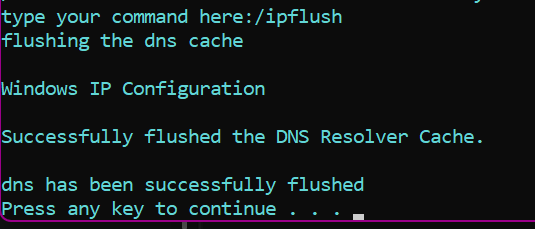
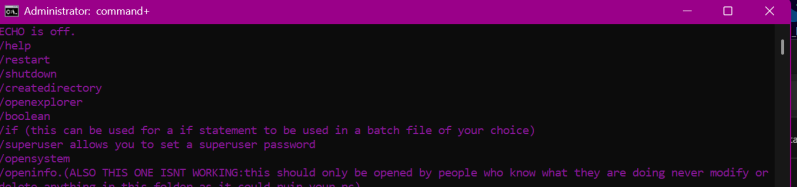
Command+ is a application that is a custom version of windows command prompt it allows users to have more access to their computer such as giving the user new commands that allow them to view hidden folders modify such see host files create tables of computer information for making simple log files that shows system time etc setting super user passwords ending tasks and more this app is a useful app that allows for more control and customization.
Source Code
@echo off
title command+
color 0E
echo Keep in mind this app is still in beta report any unknown bugs to our website more features are to come including dedicated error codes
echo Regularly check our site for updates and patches
pause
:menu
cls
echo
echo /exit
color 0a
echo /restart
echo /shutdown
color 0c
echo /createdirectory
color 5
echo /openexplorer
echo /boolean
echo /if (this can be used for a if statement to be used in a batch file of your choice)
echo /superuser allows you to set a superuser password
echo /opensystem
echo /openinfo.(ALSO THIS ONE ISNT WORKING:this should only be opened by people who know what they are doing never modify or delete anything in this folder as it could ruin your pc)
echo /system32superuserpassword
echo /bugreport
echo /recycledirectorysuperuserpassword
echo /toghf (NEW: Toggle Hidden Files ON/OFF)
echo /infosys (NEW: Display System Information Summary)
echo /ipflush
echo /hostfilesuperuserpassword
echo /uptime
echo /showdrives
echo /taskkillsuperuserpassword
echo /clear
echo /createtable creates a table of info about your system
echo /installpython
echo /installawindowsupdate use this responsibly and if installing the windows update corrupts your pc we arent responsible but if so go to recovery and uninstall the update
set /p choice="type your command here:"
if "%choice%"=="/exit" goto helpcmd
if "%choice%"=="/boolean" goto boolean
if "%choice%"=="/openexplorer" goto explorer
if "%choice%"=="/createdirectory" goto createdi
if "%choice%"=="/restart" goto restartpc
if "%choice%"=="/shutdown" goto shutdownpc
if "%choice%"=="/if" goto ifst
if "%choice%"=="/superuser" goto su
if "%choice%"=="/opensystem" goto os
if "%choice%"=="/openinfo" goto info
if "%choice%"=="/system32%passwordstore%" goto win32
if "%choice%"=="/bugreport" goto :lightmode
if "%choice%"=="/recycledirectory%passwordstore%" goto recy
if "%choice%"=="/toghf" goto toghf
if "%choice%"=="/infosys" goto infosys
if "%choice%"=="/ipflush" goto flushdns
if "%choice%"=="/hostfile%passwordstore%" goto :openhosts
if "%choice%"=="/uptime" goto :uptime
if "%choice%"=="/showdrives" goto :showdr
if "%choice%"=="/taskkill%passwordstore%" goto :killtask
if "%choice%"=="/clear" goto :exit
if "%choice%"=="/createtable" goto :tablec
if "%choice%"=="/installpython" goto :pyin
if "%choice%"=="/installwindowsupdate" goto :windupdt
goto :menu
echo.
echo./help
echo./restart
echo./shutdown
echo./createdirectory
echo./openexplorer
echo./boolean
echo./if (this can be used for a if statement to be used in a batch file of your choice)
echo./superuser allows you to set a superuser password
echo./openinfo
echo./openinfo\superuserpassword*windows/\hidden.(ALSO THIS ONE ISNT WORKING:this should only be opened by people who know what they are doing never modify or delete anything in this folder as it could ruin your pc)
echo./system32/superuserpasswordsystem\32\windows\directory\explorer*\<.>
echo./toghf
echo./infosys
timeout 5
goto :menu
:boolean
set /p variableuser="type your boolean variable name here"
echo.
echo Variable name: "%variableuser%"
set /p value="enter a value for it"
echo.
"%variableuser%" = "%value%"
set /p yousure="are you sure you are done with this variable"
set "desktopPath=%userprofile%\Desktop"
echo %variableuser% > "%desktopPath%\MyNewFile.txt"
echo %value% >> "%desktopPath%\MyNewFile.txt"
goto :menu

:explorer
start .
goto :menu

:createdi
md "%UserProfile%\Desktop\YourNewDirectoryName"
goto :menu

:restartpc
shutdown /r /f /t 5
goto :menu

:shutdownpc
shutdown /s
IF %ERRORLEVEL% EQU 0 (
    echo Shutting down.
) ELSE (
    echo error: could not shut down "%processname%".
)
pause
goto :menu

:ifst
set /p "ifholder=what is your custom if condition"
echo.
echo If condition: "%ifholder%"
set /p "doholder=what is your do cmd"
echo. if "%ifholder%"=="%doholder%"
echo.
copy and paste this to use in your batch file
timeout 600
goto :menu

:su
set /p "passwordstore=what is your superuser passcode to choose"
echo.
IF %ERRORLEVEL% EQU 0 (
    echo Successfully set superuser password being "%passwordstore%".
) ELSE (
    echo Could not create a superuser password".
)
timeout 20
timeout 20
goto :menu

:os
set /p "passwordask=enter your superuser password to contenue if you havent set one do so with /superuser"
IF "%passwordask%"=="%passwordstore%" start explorer C:\ProgramData
goto :menu

:info
set /p "passwordask=Enter your superuser password to open the info folder: "
IF "%passwordask%"=="%passwordstore%" (
    start explorer /e, C:\System Volume Information
) ELSE (
    echo. Incorrect password.
)
goto :menu

:win32
start explorer /e, C:\Windows\System32
goto :menu
:lightmode
start msedge https://www.scriptcobra.com/forms
goto :menu
:recy
start explorer.exe shell:RecycleBinFolder
goto :menu

:: --- NEW COMMANDS START HERE ---

:toghf
@echo off
setlocal
:: Define the main registry path
set "REG_PATH=HKCU\Software\Microsoft\Windows\CurrentVersion\Explorer\Advanced"

:: 1. QUERY the current 'Hidden' value (0x2 is HIDE)
reg query "%REG_PATH%" /v Hidden | find "0x2" >nul

IF %ERRORLEVEL% EQU 0 (
    :: Current state is HIDE (0x2), so we change it to SHOW (1)
    echo Showing Hidden and System Files...
    reg add "%REG_PATH%" /v Hidden /t REG_DWORD /d 1 /f
    :: Also SHOW System files (1)
    reg add "%REG_PATH%" /v ShowSuperHidden /t REG_DWORD /d 1 /f
    set MESSAGE=Hidden Files are now SHOWN.
) ELSE (
    :: Current state is SHOW (0x1), so we change it to HIDE (2)
    echo Hiding Hidden and System Files...
    reg add "%REG_PATH%" /v Hidden /t REG_DWORD /d 2 /f
    :: Also HIDE System files (0)
    reg add "%REG_PATH%" /v ShowSuperHidden /t REG_DWORD /d 0 /f
    set MESSAGE=Hidden Files are now HIDDEN.
)

:: 2. Refresh Explorer
echo.
echo Refreshing Windows Explorer...
taskkill /f /im explorer.exe
start explorer.exe

echo.
echo Operation Complete: %MESSAGE%
timeout 5 >nul
endlocal
goto :menu


:infosys
@echo off
setlocal enabledelayedexpansion
color 5B
echo.
echo =================================================================
echo           SYSTEM & OS INFORMATION (INFO SYS)
echo =================================================================
IF %ERRORLEVEL% EQU 0 (
    echo Successfully displayed system Information.
) ELSE (
    echo could not display system info.
)

:: 1. OS and System Basics
echo ## OS and System Basics
systeminfo | findstr /B /C:"OS Name" /C:"OS Version" /C:"System Manufacturer" /C:"System Model" /C:"System Type"
echo.

:: 2. Processor (CPU) Info
echo ## Processor (CPU)
for /f "skip=1 tokens=*" %%A in ('wmic cpu get Name /value') do (
    set "CPUNAME=%%A"
    set "CPUNAME=!CPUNAME:Name=!"
    echo CPU Model: !CPUNAME!
    goto :skip_wmic_cpu
)
:skip_wmic_cpu
for /f "skip=1" %%A in ('wmic cpu get NumberOfCores /value') do (
    echo Cores: %%A
    goto :skip_wmic_cores
)
:skip_wmic_cores

:: 3. Memory (RAM) Info
echo.
echo ## Physical Memory (RAM)
for /f "skip=1" %%A in ('wmic computersystem get TotalPhysicalMemory /value') do (
    set /a TotalRAM_GB=%%A/1024/1024/1024
    echo Total RAM: !TotalRAM_GB! GB
    goto :skip_wmic_ram
)
:skip_wmic_ram
echo.

:: 4. Network Info (Active IP Address)
echo ## Network
for /f "tokens=2 delims=:" %%A in ('ipconfig ^| findstr /C:"IPv4 Address"') do (
    echo Active IPv4: %%A
    goto :skip_ipconfig
)
:skip_ipconfig

echo =================================================================
echo.
pause
endlocal
goto :menu
:flushdns
color 0B
echo flushing the dns cache
ipconfig /flushdns
echo.
IF %ERRORLEVEL% EQU 0 (
    echo User has Successfully flushed dns
) ELSE (
    echo DNS COULD NOT BE FLUSHED
)
pause
goto :menu
:openhosts
echo opening hosts files remember to run as admin
start notepad C:\Windows\System32\drivers\etc\hosts
goto :menu
:uptime
color 08
echo.
echo time the system has been running
systeminfo | find "Boot Time"
echo.
pause
goto :menu
:showdr
echo.
echo =============your disk drives are here==============
wmic logicaldisk get Caption,Size,Freespace /value | findstr /V "DeviceID"
echo.
pause
goto :menu
:killtask
color 04
echo.
set /p processname="enter the process name eg:chrome.exe"
echo Attempting to terminate %processname%...
taskkill /f /im "%processname%"
echo.
IF %ERRORLEVEL% EQU 0 (
    echo Successfully terminated "%processname%".
) ELSE (
    echo Could not find or terminate "%processname%".
)
pause
goto :menu
:exit
color 04
echo the terminal will be cleared
pause
goto :menu
:tablec
echo ---------------------------------------------------------------------------------
systeminfo | findstr /B /C:"OS Name" /C:"OS Version"
echo ---------------------------------------------------------------------------------
wmic logicaldisk get Caption,Size,Freespace /value | findstr /V "DeviceID"
echo ---------------------------------------------------------------------------------
echo The current system time is %TIME%
echo ---------------------------------------------------------------------------------
echo The main administrator user on this pc is %USERNAME%
echo ---------------------------------------------------------------------------------
echo the current system date is %DATE%
echo ---------------------------------------------------------------------------------
echo the admins password is %PASSWORD%
echo ---------------------------------------------------------------------------------
echo all user directory path %ALLUSERSPROFILE%
echo ---------------------------------------------------------------------------------
echo the path to the public folder %PUBLIC%
echo ---------------------------------------------------------------------------------
echo The System Processor archatecture %PROCESSOR_ARCHITECTURE%
echo ---------------------------------------------------------------------------------
echo the number of processors is %NUMBER_OF_PROCESSORS%
echo ---------------------------------------------------------------------------------
echo your table will be displayed here
pause
goto :menu
:pyin
powershell -NoProfile -ExecutionPolicy Bypass -Command "winget install Python.Python.3 -e --accept-package-agreements --disable-interactivity"
rem debug
rem debug
rem debug
rem debug
rem debug
rem debug
rem debug
rem debug
rem debug
rem debug
rem debug
rem debug
rem debug
rem debug
goto :menu
:windupdt
set /p "protectivemeasures=enter the protection password here to run this it is not superuser password"
IF "%protectivemeasures%"=="WINDSYSTEM8998"(
    echo installing a new windows update please close all programs and use this responsibly we arent responsible for possible corruptions
timeout 120
echo Scanning for updates...
UsoClient.exe ScanInstallWait
echo Updates are being installed. This may take some time.
UsoClient.exe StartInstall
echo Installation complete. Rebooting now...
UsoClient.exe RestartDevice
rem debug
rem debug
rem debug
rem debug
rem debug
rem debug
rem debug
rem debug
rem debug
rem debug
rem debug
rem debug
rem debug
rem debug
rem debug
rem debug
rem debug
rem debug
rem debug
rem debug
rem debug
rem debug
rem debug
rem debug
rem debug
rem debug
rem debug
rem debug
rem debug
rem debug
rem debug
rem debug
rem debug
rem debug
rem debug
rem debug
rem debug
rem debug
rem debug
rem debug
rem debug
rem debug
rem debug
rem debug
rem debug
rem debug
rem debug
rem debug
rem debug
rem debug
) ELSE (
    ECHO. COULDNT FIND OR INSTALL WINDOWS Updates
)
pause
GOTO :MENU